How to set boot page of TPEditor software program?
Start TPEditor software program and click View > Boot Page from the menu bar.
Download the completed boot screen to TP series.
Click Communication > Write Boot Page to TP. Finally, in the system main menu of TP series, choose "4.TP0X SETUP" > "8.START-UP DISPLAY" > "2.USER DEFINE" to complete the editing of Boot Page.


 Download the completed boot screen to TP series.
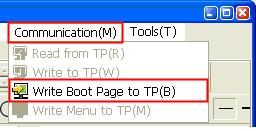 Click Communication > Write Boot Page to TP. Finally, in the system main menu of TP series, choose "4.TP0X SETUP" > "8.START-UP DISPLAY" > "2.USER DEFINE" to complete the editing of Boot Page.