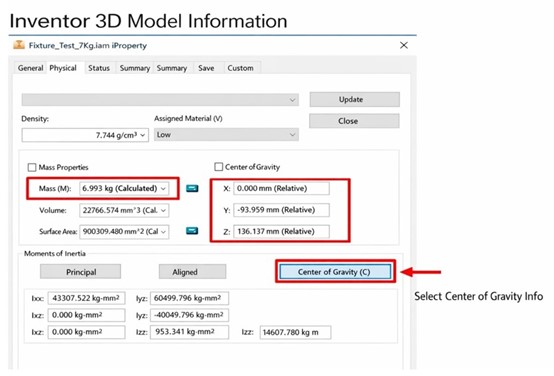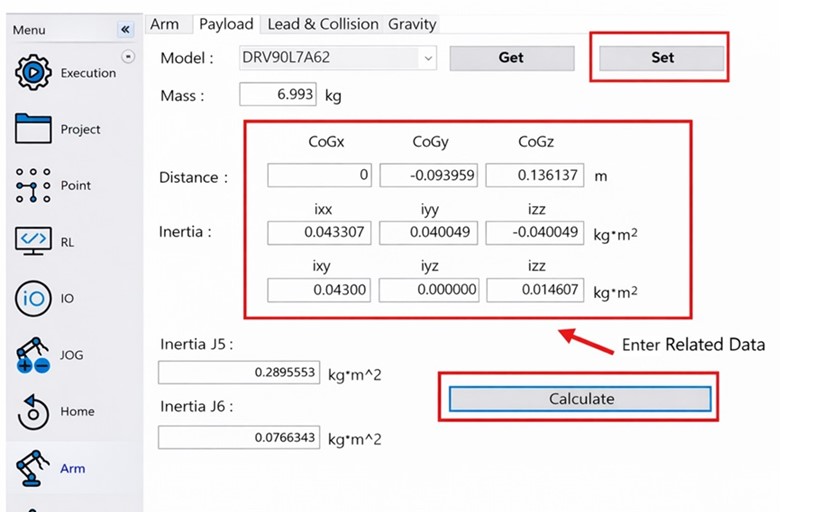
Vibration during operation due to incorrect robot payload settings can be resolved by properly configuring the payload parameters as follows:
1. Use CAD software to verify the jig information on the flange, such as weight, center-of-gravity offset, and inertia values.
2. Connect to the robot arm using DRAStudio software.
3. With the robot servo turned off, go to Arm in the left-hand menu, open the Payload page, enter the verified payload data, and click Calculate to confirm that the inertia values comply with the robot’s specifications.
4. Click Set to complete the payload configuration.